How a Family Ring Layout Changes from One to Eight Birthstones
Understand how one to eight simulated birthstones change a family ring's visual density, then verify count, names, month order, and ring size separately.
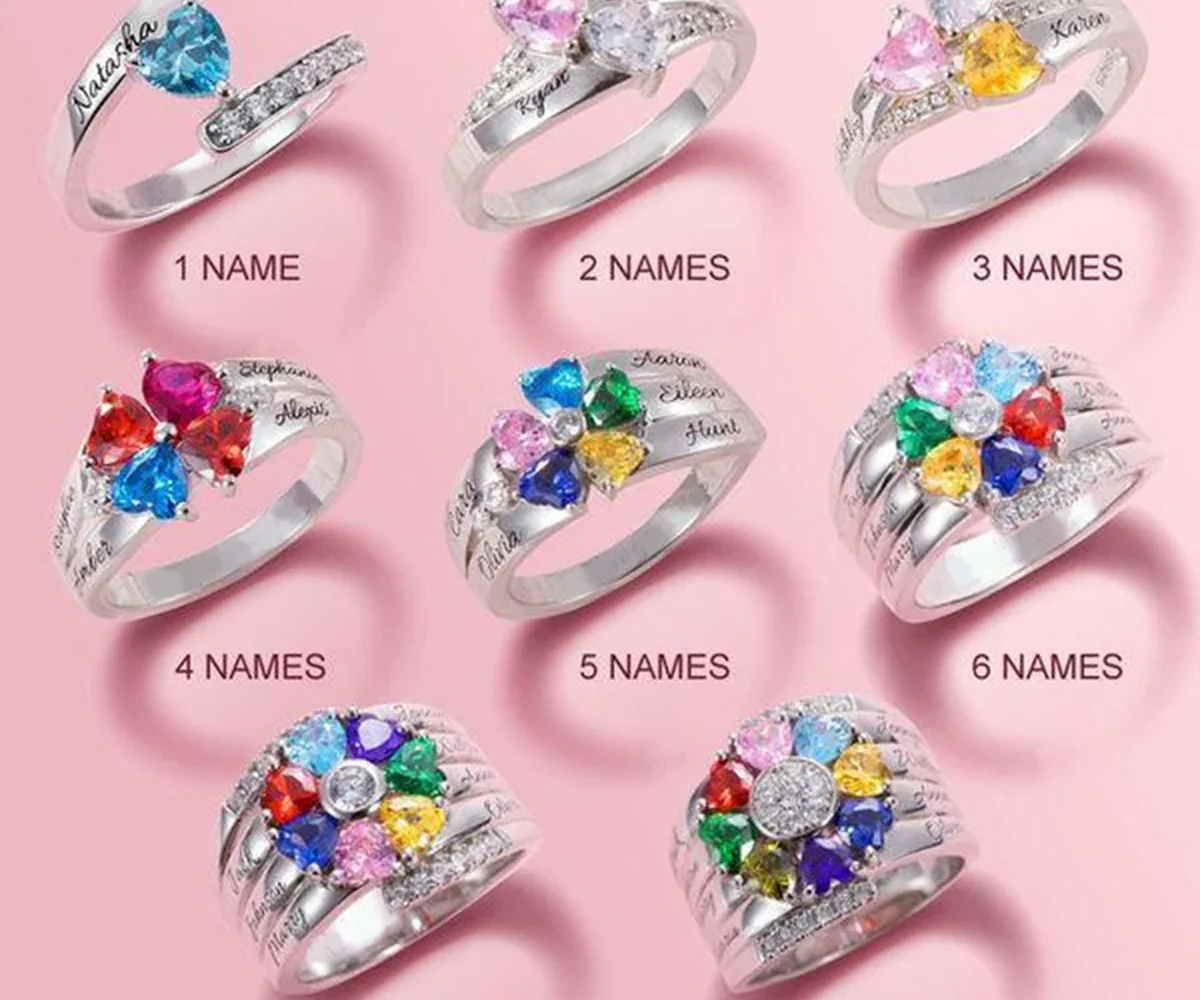
A family ring birthstone layout becomes visually denser as the count rises from one accent toward eight. A single simulated birthstone creates a clear focal point; several accents form a more complex cluster in which individual colors share less visual space. Choose the number from the confirmed family list, then review the current product examples without expecting a precise arrangement that the listing does not promise.
Think in density ranges, not eight separate products
The same ring concept can carry different amounts of information. One or two accents create a restrained arrangement. A middle count creates a grouped family palette. Seven or eight produce a fuller cluster where the overall combination may be more noticeable than any one color.
These are useful visual ranges, not guarantees about exact spacing, orientation, or prominence. Product imagery can show representative layouts, but angle, crop, lighting, and screen size affect what you perceive. Do not infer a precise final map for every count from one enlarged image.
View the guide at ordinary screen size and, when dimensions are available, compare the ring with one the recipient already wears. Magnification is excellent for checking structure but can make every gap and accent appear larger than it will during daily use.
Birthstone traditions and alternatives vary across places and eras. In an Amorieva ring order, the relevant choices are month labels represented by simulated birthstone accents. The count should equal the people you intend to include, even when two people share the same month and color.
Start with people, then create the color sequence
Write one numbered row for every person. Include the approved name or short engraving, confirmed calendar birth month, and intended position. Choose an order rule—oldest to youngest, household grouping, or another meaningful sequence—and apply it consistently.
Do not add an accent simply to balance the cluster or remove a repeated month to create variety. A layout is accurate when it represents the selected people. The family birthstone month guide can help you check conventional associations, while the product form provides the actual selectable labels.
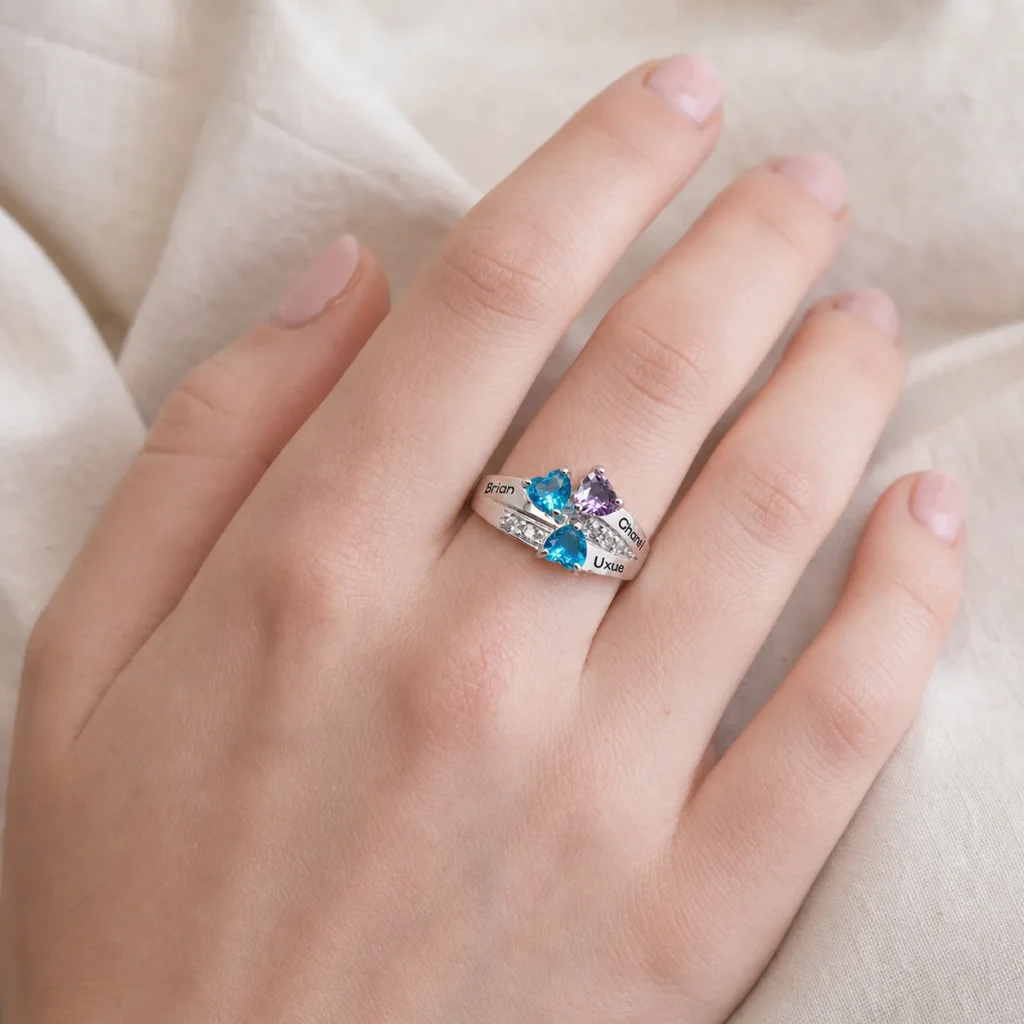
Apply the range to the family constellation ring
The Family Constellation Name Ring currently supports one to eight simulated birthstone accents, name or short engraving, and US sizes 6 through 10. It is a plated metal ring. The product does not currently include a three-tone finish selector.
With a low count, verify that the intentionally open-looking layout matches the recipient’s taste. With a high count, decide whether they enjoy a fuller, multicolor cluster and whether the chosen engraving remains the right way to anchor the family story. Capacity of eight is an option, not a requirement to fill every position.
For a count in the middle, pay attention to the cluster as a group rather than ranking one accent as central unless the current product form explicitly establishes that position. The family sequence should remain a planning record even when the final composition reads collectively.
Ring size is a separate essential fact. Use the existing Amorieva ring-size measurement guide and confirm the intended finger. A correct family layout in the wrong size is still an unsuccessful order.
Review count, order, and size independently
Run three passes instead of one:
- Count pass: the number of people, worksheet rows, and selected accents agrees.
- Order pass: every name or engraving is associated with the intended month position.
- Size pass: the US size matches a recent measurement for the intended finger.
Then compare the overall visual density at the chosen count. If the highest-capacity cluster feels too busy for the recipient, do not quietly omit relatives. Select a different current family-jewelry structure from the Amorieva shop that can tell the agreed story more clearly.
Plan care for a raised, detailed cluster
Small accent settings and plated surfaces benefit from gentle handling. Keep the ring dry, remove it before showering, swimming, exercise, saltwater, and chlorinated water, and avoid perfume and household chemicals. Wipe it softly and store it separately so the detailed area does not rub against other jewelry.
Do not use the accent cluster as a grip when removing the ring. Handle the band gently and consult the current product care information before trying a cleaning method.
Common questions
Will an eight-birthstone ring look exactly like the guide image?
Use the image to understand the fuller visual density, not as a promise of exact spacing or screen color. The current product description and selected fields define the configuration.
What if two family members share a birth month?
Select the same month for both people. Repeated simulated birthstone colors can be accurate; their ordered positions and the engraving plan keep the family record clear.
Should I fill all eight positions because they are available?
No. Select one accent for each person intentionally included. Additional capacity gives larger families an option, but an unassigned decorative accent would weaken the name-to-month record.
Let the verified count shape the cluster
A family ring layout should grow from one true list, not from a desire to fill or balance the design. Confirm people and months, preview the density range, measure the ring size, and review each decision separately. The final cluster can then be compact or full while still representing exactly the family story intended.